IPTV: what it is and how it works in every room ?
What it is, how the stream travels from the server to the living-room TV or the tablet sitting in the kitchen, what sets it apart from terrestrial, satellite and your internet provider's set-top box, and the equipment and internet speed you need: the guide to read before setting up an IPTV subscription throughout the home.
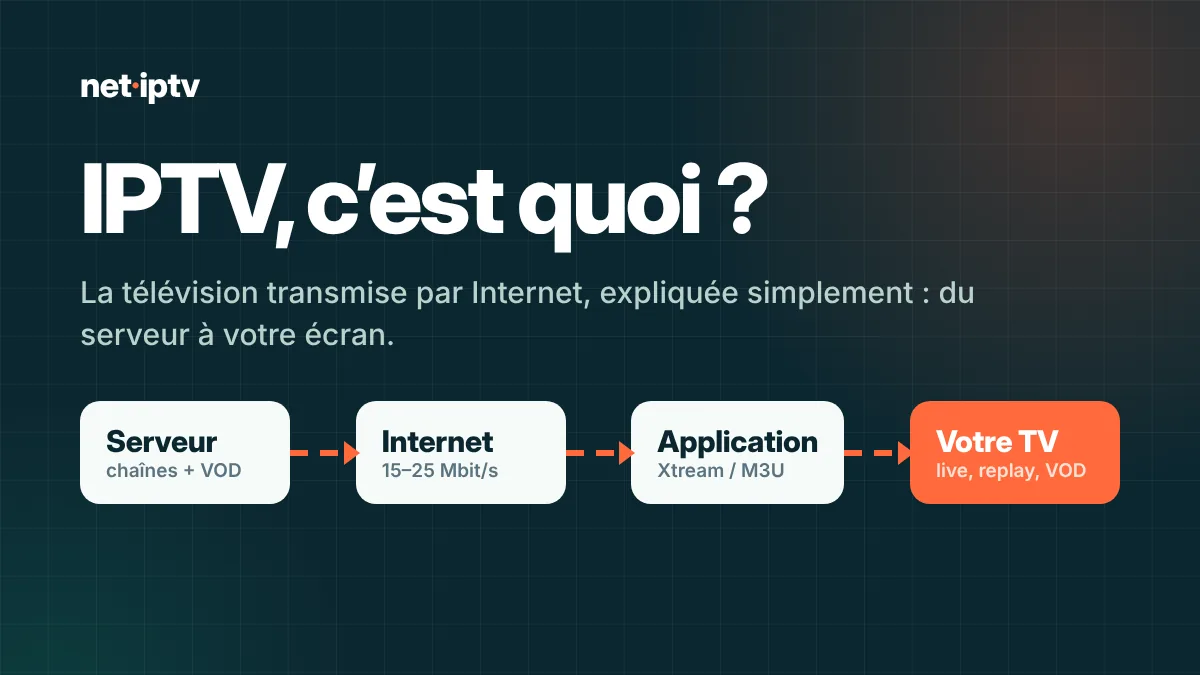
IPTV in everyday terms
The letters IPTV stand for Internet Protocol Television, i.e. television delivered over the internet protocol. In other words, the news bulletin you follow in the kitchen, the Saudi Pro League match in the living room and the cartoons in the kids' room all travel through your router like any video on the internet, with no aerial on the roof and no dish mounted on the balcony.
If the question " what is IPTV " keeps coming up for you, remember the short version: IPTV is neither a device nor an app. It is first and foremost a delivery method for television. Internet providers' set-top boxes, video-on-demand services and an IPTV subscription like Ishtirak IPTV all rest on the same idea: TV in every room, carried over your internet connection.
In practice, an IPTV subscription usually brings together three types of content:
- Live TV : channels broadcast continuously, ideal for the Thursday night match in the living room or the morning news over breakfast;
- VOD : a library of movies and series you play whenever you like, in bed on the tablet or on the big screen;
- Catch-up : on some channels, the option to rewatch a program or episode that aired yesterday.
To make browsing easier, the TV guide (EPG) is added on top: it shows what is on now and what comes next, so nobody misses the start of their program, whatever the room.
From the server to every room in the home: the path of an IPTV stream
Between the channel's studio and the screen in your bedroom or living room, the journey has four stages.
- Capture and encoding. The channel's signal is captured first, then compressed with a video codec such as H.264 or H.265 (HEVC). This compression greatly reduces the size of the stream while keeping a picture that looks sharp to the eye. At the same quality, H.265 is about twice as efficient as H.264, which matters a lot for a 4K movie on the living-room TV.
- Splitting into segments. Once compressed, the stream is cut into small chunks of a few seconds. A protocol such as HLS then lets the player fetch these chunks one after another, in the right order.
- Transport. The servers send these chunks over the internet to your router. Each home, and each screen in the house, receives its own stream, delivered on demand.
- Playback. On the TV, box or phone, the IPTV app reassembles the chunks, decodes them and displays the picture. It always keeps a few seconds in reserve in what is called the buffer, which is enough to absorb small fluctuations in speed without the picture freezing.
To connect to the service, your app asks for login details, available in two forms. The Xtream Codes form combines the server URL, username and password: the app then sorts channels, movies and series automatically. The M3U link form boils down to a single address containing the full channel list. Whichever form you choose, you get the same library.
And what about when the picture freezes in the middle of the match? It means the player is emptying its buffer faster than it fills it: at that moment the speed is no longer sufficient, often because the Wi-Fi is saturated by the home's other devices. That is why your connection matters as much as the service itself for stable IPTV.
Where does your internet provider's set-top box fit into all this?
If you watch your programs through your internet provider's set-top box, you are most likely already using IPTV without knowing it. With an independent IPTV subscription, what differs is the signal's path. The provider's box receives TV over the provider's private network, with bandwidth reserved for it. An independent service like Ishtirak IPTV travels over the public internet, at your usual speed. Hence the importance of a well-tuned setup in every room: an Ethernet cable whenever possible, 5 GHz Wi-Fi, and a device that is recent enough.
IPTV compared with terrestrial, satellite and the provider's set-top box
Four ways to bring TV into your home, and four completely different approaches.
| Criterion | IPTV (subscription) | Terrestrial (aerial) | Satellite (dish) | Provider's set-top box |
|---|---|---|---|---|
| Delivery medium | Your internet connection | Terrestrial waves | Satellite signal | Provider's closed network |
| Equipment needed | An internet-connected device and an IPTV app | Aerial + compatible TV | Dish + receiver | Router and the provider's set-top box |
| Channel line-up | Very wide, Arabic, Gulf and international channels | National and local channels only | Depends on the package subscribed to | Depends on the paid options |
| VOD and catch-up | VOD included, catch-up on some channels | No | Rarely | Depends on the options |
| On which screens | TV, box, phone, tablet, computer: every room | The TV connected to the aerial | The TV connected to the receiver | Mainly at home, through the set-top box |
| What to watch out for | Internet speed and Wi-Fi quality from room to room | Coverage in your area | Installing the dish | Commitment and the price of options |
The equipment you need at home
Good news: in most homes the basics are already there. You need four things, no more.
- An internet connection : fibre, 4G/5G or satellite internet, as long as the speed is sufficient (our guidelines are detailed in the table below).
- compatible device : a Samsung or LG Smart TV in the living room, Android TV or Google TV, a Fire TV Stick in the bedroom, iPhone, iPad, Apple TV, a Windows or Mac computer in the home office. MAG or Enigma devices remain possible on request.
- An IPTV app : IPTV Smarters Pro, TiviMate, XCIPTV, IBO Player or VLC, depending on each room's device.
- Ishtirak : this is what gives you access to the library and delivers your login details.
No antenna, no dish, no receiver to install. An old TV sitting unconnected in the guest room does the job perfectly once you plug an Android TV box or a Fire TV Stick into its HDMI port.
Which IPTV app should I choose?
Think of the app as a remote: it contains no channels of its own, it simply plays the channels of your subscription. Which one you choose depends mainly on the device in the room.
- Samsung and LG Smart TVs : IBO Player, installed straight from the TV's app store.
- Android TV, Google TV and Fire TV Stick : TiviMate if you want a full TV guide, IPTV Smarters Pro to keep things as simple as possible, and XCIPTV for less powerful devices.
- iPhone, iPad, Apple TV : IBO Player, or the Smarters app available on the App Store.
- Computer : IPTV Smarters, or simply VLC to open the M3U link in seconds.
Some apps require a paid activation from their publisher, others are completely free. Our IPTV app comparison covers each case in detail, and our installation guide walks you through the steps for every device in the home.
What internet speed do I need?
Here are our benchmarks for each screen running at the same time in the home. Leave some headroom for the household's other uses, such as the games console in the kids' room or video calls for remote work in the home office.
| Use | Recommended speed | Recommended connection |
|---|---|---|
| 1 HD / Full HD screen | 15 Mbps | 5 GHz Wi-Fi or Ethernet |
| 1 4K screen | 25 Mbps | Ethernet preferred |
| 2 HD screens | 30 Mbps | 5 GHz Wi-Fi or Ethernet |
| Two screens, one of them in 4K | 40 Mbps | Ethernet for the 4K screen |
| 4 HD screens | 60 Mbps | Fibre recommended |
How to choose an IPTV subscription
An IPTV subscription should be judged on concrete points, not big promises. Check these before you pay anything.
- Clear technical information. A serious service clearly states the recommended internet speed and the compatible devices and apps. If that information stays vague, be wary of the rest.
- Number of simultaneous screens. With a 1-screen plan, only one stream can play at a time. If the living room is following a match while the kids' room is watching cartoons, you need a multi-screen IPTV plan.
- Payment method. Make sure there is no hidden auto-renewal in the offer. With Ishtirak IPTV you pay once through a secure link, no card is stored, and nothing renews without your consent.
- Support response time. Test it before you buy: ask a question and see whether a real person answers quickly, clearly, and in English or Arabic.
- Refund policy. Read it to the end. It reveals how much confidence the service has in its own technology.
That is exactly the approach of IPTV subscription : plans from 1 to 12 months, 2-, 3- or 4-screen options to cover every room, support from real people on WhatsApp and email, and step-by-step guides. You will find the plan details on the Pricing.
Common mistakes to avoid
Most disappointments come from a handful of common mistakes, easy to avoid once you know them.
- Watching a 4K movie over 2.4 GHz Wi-Fi. This band goes through walls well, but it saturates quickly. Switch to the 5 GHz network on your router or, better still, connect the living-room TV with an Ethernet cable.
- Relying on a very old device. A Smart TV from a few years ago may sometimes struggle to decode 4K or H.265. A recent Android TV box solves the problem in most cases, without a big budget.
- Sharing a 1-screen plan between two rooms. Starting a second stream at the same time cuts off the first. Nothing is broken: it is the limit set by the plan.
- Mistyping your login details. An extra space, a forgotten capital letter or a missing
http://, and the connection is refused. Use copy and paste whenever you can. - Interrupting the first load. With a library this size, the app may take a minute or two to fetch everything the first time it opens. Let it quietly finish its work.
- Forgetting to update the TV guide. If the EPG is not refreshed regularly, the times shown become wrong. Turn on automatic updates in the app.
- Buying a device without checking compatibility. The Fire TV Stick 4K Select, which runs Vega OS, does not accept apps from outside the Appstore. Before buying a device for IPTV, make sure it is compatible.
Your questions, our answers
Do I really need a Smart TV?
No. Samsung and LG Smart TVs work with IBO Player, but a regular TV does the job too if you add a Fire TV Stick or an Android TV box. Phones, tablets and computers work as well, in any room.
Does it matter which internet provider I use?
No, any of them will do: IPTV uses your internet connection whoever your provider is. What matters is the speed you actually get and the quality of the Wi-Fi all the way to the screen in question.
Xtream Codes or M3U: what is the difference?
They are two ways of reaching the same library. With Xtream Codes (server, username, password) the app separates live TV, movies and series. M3U is a single address containing the whole list, handy with VLC or some players.
Can the whole household watch at the same time?
Yes, provided you choose a multi-screen plan: 2, 3 or 4 devices at once, one in each room if you like. The 1-screen plan only allows one stream at a time.
What is Ishtirak IPTV?
Ishtirak IPTV is an IPTV subscription designed for Saudi Arabia and for every room in the home: 36,000+ live channels, 260,000+ movies and series, a one-time payment with no auto-renewal, and support in English and Arabic 7 days a week. Discover our plans.
Your turn: TV in every room
Choose your plan, receive your login details as soon as payment is confirmed, then follow the setup guide that matches the device in each room.